AI Writes Fast. Your Safety Net Needs to Be Faster.
A simple SwiftUI pattern makes broken navigation states impossible to write, and impossible to miss in testing — whether the code came from a teammate who understood the app, or an AI agent that didn't.

I’ve been writing code for the past year switching between Copilot, Claude Code and Codex (sorry Cursor, it just didn’t happen). With these tools, building a flow of screens for an app — the UI, the model, a first pass at test coverage — takes minutes instead of days.
What hasn’t gotten any faster is what happens next: the review process of the code changes before merging it into a large, live production project. It has to be manually reviewed line by line. Am I confident that an agent-generated PR is correct? Definitely not. It generates plausible code that compiles, but often has a subtle change that isn’t correct. In general, the higher velocity output in generated code has led to more bugs — AI-generated code creates 1.7x more problems than human-written code, per CodeRabbit’s analysis.
For example, a test case that has an expectation = 0 OR != 0. What does this even mean? Generated unit tests devoid of meaning are not uncommon. You have to check every line of code. You own that code once it is generated. If you just glance over it and think — “Looks good to me”, you are taking on a risk.
Can something be done to make validation easier, and the output of generated code less susceptible to breaking? That’s the question this article is really about. Implicit versus explicit states. Explicit states are testable.
The Navigation Trap
Let’s start with a view that shows a settings screen in a modal fashion.
@State private var isShowingSettings = false
A button toggles this to display it. This sets the scene. It starts with one flag. Then another is added, and another. Months later a feature lands and brings one more. No one is checking every combination on each update. The original developer has left the team and those that remain don’t have all the context. Under pressure to roll out another update, no one wants to do a thankless rewrite.
Navigation States Invisible to Tests
Most SwiftUI navigation is controlled by flags internal to the view, with no model property to assert against. Unit tests will not validate the state as it is unreachable. XCUITests are often only covering the main flows, since they are expensive to write, slow to run, and brittle to maintain. This gap exists in every codebase where navigation lives in views, and it predates AI agents by a long way.
Some years ago I saw this happen: The “Purchase” button in the checkout stopped working. It didn’t display the checkout screen. No customer could complete a purchase. No test covered this case.
A test suite cannot validate what it cannot see. If navigation state is implicit, it is invisible. That was already true when the only thing editing the code was a person who’d been in the room for every decision that led to it. When an agent is churning out code, it becomes critical — neither the agent nor the reviewer has a signal when a navigation transition is silently removed.
Making Impossible States Impossible
Richard Feldman introduced this idea in his 2016 talk of the same name: Making Impossible States Impossible. This insight applies directly to navigation. Instead of independent boolean flags, I model the screen’s possible states as a single enumerated type — and let the compiler enforce that only one can be active at a time.
When most developers talk about navigation they mean pushing a detail screen, popping back to a list with the back button. But navigation is any decision about what the user sees. A sheet is navigation. An alert is navigation. A confirmation dialog is navigation. They all share the same underlying question: what is active right now, and what data does it need? Modeling them the same way means solving this problem once.
Consider this code example for a simple SwiftUI view
struct ProductView: View {
    let product: Product

    @State private var showReviews   = false
    @State private var showShare     = false
    @State private var showAddReview = false
    @State private var showError     = false
    @State private var errorMessage  = ""

    var body: some View {
        NavigationStack {
            ScrollView {
                ProductContent(product: product)

                VStack(alignment: .leading, spacing: 12) {
                    Text("Customer Reviews")
                        .font(.headline)
                    Text("This product has received great feedback from our customers.")
                        .foregroundStyle(.secondary)
                    Button("See all reviews") { showReviews = true }
                }
                .padding()

                Button("Add Review") { showAddReview = true }
                    .padding()
            }
            .toolbar {
                Button("Share") { showShare = true }
            }
            .navigationDestination(isPresented: $showReviews) {
                ReviewsView(product: product)
            }
            .sheet(isPresented: $showShare) {
                ShareView(product: product)
            }
            .sheet(isPresented: $showAddReview) {
                AddReviewView(product: product)
            }
            .alert("Error", isPresented: $showError) {
                Button("OK") { showError = false }
            } message: {
                Text(errorMessage)
            }
        }
    }
}
It has a toolbar at the top of the screen with a button that when tapped displays a modal sheet. Below the text block there are two more buttons that will navigate to other screens. Nothing prevents showShare, showAddReview, and showError from being true simultaneously. Code is needed to block an error being shown if the string is empty. That is four navigations with sixteen combinations.
Now adopting an enumeration for navigation look at the following code:
struct ProductView: View {
    let product: Product

    @State private var destination: Destination?

    enum Destination {
        case reviews
        case share
        case addReview
        case error(String)
    }

    var body: some View {
        NavigationStack {
            ScrollView {
                ProductContent(product: product)

                VStack(alignment: .leading, spacing: 12) {
                    Text("Customer Reviews")
                        .font(.headline)
                    Text("This product has received great feedback from our customers.")
                        .foregroundStyle(.secondary)
                    Button("See all reviews") { destination = .reviews }
                }
                .padding()

                Button("Add Review") { destination = .addReview }
                    .padding()
            }
            .toolbar {
                Button("Share") { destination = .share }
            }
            .navigationDestination(isPresented: Binding(
                get: { if case .reviews = destination { return true }; return false },
                set: { if !$0 { destination = nil } }
            )) {
                ReviewsView(product: product)
            }
            .sheet(isPresented: Binding(
                get: { if case .share = destination { return true }; return false },
                set: { if !$0 { destination = nil } }
            )) {
                ShareView(product: product)
            }
            .sheet(isPresented: Binding(
                get: { if case .addReview = destination { return true }; return false },
                set: { if !$0 { destination = nil } }
            )) {
                AddReviewView(product: product)
            }
            .alert("Error", isPresented: Binding(
                get: { if case .error = destination { return true }; return false },
                set: { if !$0 { destination = nil } }
            )) {
                Button("OK") { destination = nil }
            } message: {
                if case .error(let message) = destination { Text(message) }
            }
        }
    }
}
Note how the destination enum is defined as an optional where nil means nothing is shown. Setting .share while .addReview is already active is structurally impossible, because there is only one variable. Next, the error message is no longer a separate floating String. It lives inside the .error case as an associated value — the data and the state that needs it are bound together.
SwiftUI’s sheet and alert modifiers work with a Bool binding — they need to read whether something is presented and write false when it is dismissed. The manual Binding here bridges that gap: the get checks whether the destination matches the relevant case, and the set clears the destination when the user dismisses. Let me say this out loud: This isn’t pretty. I will show how this glue code can be cleaned up shortly.
Scaling It Up
The argument gets more concrete with a realistic feature. An account settings screen might let the user edit their profile, add a shipping address, or manage their saved cards. Three destinations, each reachable from the same parent view.
With boolean flags:
var isShowingEditProfile = false
var isShowingAddAddress  = false
var isShowingCards       = false
Three booleans produce eight possible combinations. Only four are valid: all false, or exactly one true. The rest are illegal states the type system cannot prevent. Every transition function must clear the others before setting the new one, and every destination added later requires updating every existing transition.
The enum collapses this:
@CasePathable
public enum Destination: Equatable {
    case editProfile(UserProfile)
    case addAddress
    case savedCards
}

var destination: Destination?
Four states: nil and each case. Setting .addAddress while .savedCards is active is structurally impossible since there is only one property.
The associated value in .editProfile compounds the advantage. With boolean flags, isShowingEditProfile = true while the profile itself is nil is a legal combination in the type system — an edit screen with nothing to display. The enum makes that inexpressible: .editProfile carries the UserProfile it needs. The data and the state are the same value; they cannot be separated.
This is the pattern every model in the project follows. ShopApp has twenty-seven screens across eight feature modules. Each one is reached by assigning a single destination property. There is no need to clear values, and no defensive guards against combinations that should never exist. Just clean code.
The model side of the pattern is straightforward. The friction is on the SwiftUI side: connecting a single destination property to the full range of SwiftUI’s presentation APIs — push navigation, sheets, full-screen covers, alerts — is not something SwiftUI supports natively from a single source of truth. Understanding why requires a short detour through what NavigationStack actually solves, and what it doesn’t.
NavigationStack
Before iOS 16, push navigation in SwiftUI was driven by NavigationLink(destination:) — a view-level declaration that embedded the destination directly in the link. There was no way to trigger navigation from model code, no way to restore a navigation stack from state, and no way to deep link into a specific screen without constructing the entire view hierarchy up front.
NavigationStack, introduced in iOS 16, changed this. Push navigation follows from data, not from view structure. That is a genuine step forward: the stack is inspectable, restorable, and testable without running the app.
But NavigationStack covers only push navigation. Sheets, alerts, confirmation dialogs, and popovers each still require their own independent state, with nothing to coordinate them or prevent conflicts. It solves one surface well, but navigation (as described above) is all of them.
The SwiftNavigation Library
The Point-Free team describe their libraries as filling “fundamental gaps in the Apple ecosystem that we think should some day be a part of Swift or SwiftUI natively.” SwiftNavigation is exactly that — the consistent, data-driven navigation model that NavigationStack hinted at but didn’t finish.
The key addition is the @CasePathable macro. It allows a binding to be derived directly from any case of a Destination enum, eliminating the manual Binding(get:set:) code entirely:
// Push
.navigationDestination(isPresented: Binding($destination.reviews)) {
    ReviewsView(product: product)
}

// Sheet
.sheet(isPresented: Binding($destination.addReview)) {
    AddReviewView(product: product)
}

// Alert with associated value
.alert("Error", isPresented: Binding($destination.error)) {
    Button("OK") { destination = nil }
} message: {
    if case .error(let message) = destination { Text(message) }
}
Swift’s type system is doing the heavy lifting — the SwiftUI API just doesn’t go far enough out of the box. Read their documentation for more details.
Cleaner Navigation
As promised here is the cleaned-up code:
struct ProductView: View {
    let product: Product

    @State private var destination: Destination?

    @CasePathable
    enum Destination {
        case reviews
        case share
        case addReview
        case error(String)
    }

    var body: some View {
        NavigationStack {
            ScrollView {
                ProductContent(product: product)

                VStack(alignment: .leading, spacing: 12) {
                    Text("Customer Reviews")
                        .font(.headline)
                    Text("This product has received great feedback from our customers.")
                        .foregroundStyle(.secondary)
                    Button("See all reviews") { destination = .reviews }
                }
                .padding()

                Button("Add Review") { destination = .addReview }
                    .padding()
            }
            .toolbar {
                Button("Share") { destination = .share }
            }
            .navigationDestination(isPresented: Binding($destination.reviews)) {
                ReviewsView(product: product)
            }
            .sheet(isPresented: Binding($destination.share)) {
                ShareView(product: product)
            }
            .sheet(isPresented: Binding($destination.addReview)) {
                AddReviewView(product: product)
            }
            .alert("Error", isPresented: Binding($destination.error)) {
                Button("OK") { destination = nil }
            } message: {
                if case .error(let message) = destination { Text(message) }
            }
        }
    }
}
I’ve kept this intentionally simple and is not using an observable model. In the ShopApp state is moved entirely into an @Observable model, which is what makes it testable without a running app.
The Dependency Cost
Adding SwiftNavigation without configuration brings in seven transitive packages. For teams managing a strict dependency budget, that is a legitimate objection.
The library addresses this through a traits system that lets you declare only the capabilities you need. The PointFree team explain the approach in their blog post. The catch: SPM traits require Swift 6.1. Projects still on an earlier compiler cannot use them and take the full seven dependencies. At its most basic SwiftNavigation depends on SwiftSyntax for the macro implementation. Then since case paths offer improved ergonomics around bindings, this is also good to add. This has a dependency on XCTest dynamic overlay. That is 3 dependencies in total.
What Explicit State Unlocks
Moving navigation state into a model property has an advantage that justifies the change on its own. If the screen the user sees is determined by a plain Swift property, that property can be set in a unit test without running the simulator that can complete in a few seconds.
The snapshot testing library from the Point-Free team renders a SwiftUI view off-screen using UIKit and writes the result to a PNG file. It takes mere seconds. Combined with a model whose state is injectable, the complete test looks like this:
@Test("Payment failed screen renders correctly")
func paymentFailed() async throws {
    let model = CheckoutModel(cart: CartItem.stubs)
    model.destination = .paymentFailed(.cardDeclined)
    assertSnapshot(of: CheckoutView(model: model),
                   as: .image(layout: .device(config: .iPhone13Pro)))
}
If you compare this to a UI test, it is multiple times faster to execute. This is what explicit state unlocks: every case in the Destination enum is a reachable screen state that you can unit test.
Testing a Full Navigation Flow
The ShopApp tests show this in action. In fact, it implements both UI tests alongside snapshot tests to make the comparison easy.
The happy path funnel test walks every step of the checkout: cart, shipping address, delivery options, payment method, card entry, and confirmation.
@Test("Happy path — snapshot every step of the checkout funnel in sequence")
func happyPathFunnel() async throws {
    let model = CheckoutModel(
        cart: CartItem.stubs,
        repository: StubCheckoutRepository(delay: .zero)
    )
    model.savedAddresses = [.stub]

    // Step 1 — Cart
    assertSnapshot(of: CheckoutView(model: model),
                   as: .image(layout: .device(config: .iPhone13Pro)),
                   named: "step_1_cart")

    // Step 2 — Address form
    model.proceedToAddress()
    assertSnapshot(of: CheckoutView(model: model),
                   as: .image(layout: .device(config: .iPhone13Pro)),
                   named: "step_2_address")

    // Step 3 — Order options (delivery speed + extended guarantee)
    model.submitAddress(.stub)
    assertSnapshot(of: CheckoutView(model: model),
                   as: .image(layout: .device(config: .iPhone13Pro)),
                   named: "step_3_order_options")

    // Step 4 — Payment method selection
    model.proceedToPaymentMethod(address: .stub)
    assertSnapshot(of: CheckoutView(model: model),
                   as: .image(layout: .device(config: .iPhone13Pro)),
                   named: "step_4_payment_method")

    // Step 5 — Card entry form
    model.selectPaymentMethod(.creditCard, address: .stub)
    assertSnapshot(of: CheckoutView(model: model),
                   as: .image(layout: .device(config: .iPhone13Pro)),
                   named: "step_5_payment_entry")

    // Step 6 — Confirmation (resolves instantly with delay: .zero)
    await model.submitPayment(address: .stub, cardToken: "tok_test")
    assertSnapshot(of: CheckoutView(model: model),
                   as: .image(layout: .device(config: .iPhone13Pro)),
                   named: "step_6_confirmation")
}
Each step is a direct model method call followed by a snapshot. The test does not tap buttons — it calls exactly the same functions the buttons call. model.proceedToAddress() is not a test helper; it is the function the “Proceed to Checkout” button invokes in the live app.
StubCheckoutRepository(delay: .zero) matters for step 6. The real repository waits on a network response. The stub resolves immediately. await model.submitPayment(…) is real async — the test awaits the actual completion of the payment flow. When it returns, the model has transitioned to .confirmation.
The XCUITest equivalent covers the same funnel:
func test_happyPath_completesCheckoutFromCartToConfirmation() throws {

    // ── 1. Cart ───────────────────────────────────────────────────────────
    XCTAssertTrue(
        app.navigationBars["Your Cart"].waitForExistence(timeout: 5),
        "Cart screen should be the initial screen"
    )
    app.buttons["Proceed to Checkout"].tap()

    // ── 2. Shipping Address ───────────────────────────────────────────────
    XCTAssertTrue(
        app.navigationBars["Shipping Address"].waitForExistence(timeout: 5)
    )
    app.staticTexts["Jane Appleseed"].firstMatch.tap()
    app.navigationBars.buttons["Continue"].tap()

    // ── 3. Delivery & Extras ──────────────────────────────────────────────
    XCTAssertTrue(
        app.navigationBars["Delivery & Extras"].waitForExistence(timeout: 5)
    )
    app.navigationBars.buttons["Continue"].tap()

    // ── 4. Payment Method ─────────────────────────────────────────────────
    XCTAssertTrue(
        app.navigationBars["Payment"].waitForExistence(timeout: 5)
    )
    app.buttons["Credit / Debit Card"].tap()

    // ── 5. Card Entry ─────────────────────────────────────────────────────
    let cardField = app.textFields["Card number"]
    XCTAssertTrue(cardField.waitForExistence(timeout: 5))
    cardField.tap()
    cardField.typeText("4111111111111111")
    app.textFields["MM/YY"].tap()
    app.textFields["MM/YY"].typeText("12/26")
    app.textFields["CVV"].tap()
    app.textFields["CVV"].typeText("123")
    app.navigationBars.buttons["Pay now"].tap()

    // ── 6. Confirmation ───────────────────────────────────────────────────
    XCTAssertTrue(
        app.staticTexts["Order Confirmed!"].waitForExistence(timeout: 10),
        "Order confirmation should appear after successful payment"
    )
}
This is a faithful description of what the user does. That is also its weakness. Every waitForExistence(timeout: 5) is the test waiting for the live app to catch up. The card fields require typeText. Confirmation waits up to ten seconds. The full test takes up to 59 seconds depending on build warm-up. The app must be launched, the full composition root initialised, and every navigation transition actually animated through the real NavigationStack.
There is also a production code consequence. The payment method buttons in PaymentMethodSelectionView are custom layouts — an HStack containing an icon, a title, and a subtitle. XCUITest cannot identify a button without an explicit accessibility identifier. The view carries .accessibilityLabel(method.rawValue) not because the feature required it, but because the test did. The snapshot test required no change to production code.
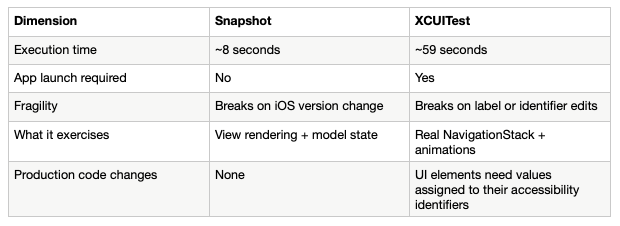
Look at the second row: the snapshot test runs inside a booted simulator, but the app is never launched. The test renders one view from one model state and exits. Six of them in sequence take 8 seconds. The XCUITest must boot the full app, navigate five live screens with real animations, enter card details field by field, and wait for confirmation — 59 seconds for the same path.
Neither replaces the other. XCUITests exercise the real NavigationStack, real animations, and the full composition root. Some interactions — deep links, push notifications, background transitions — can only be verified by running the actual app. The argument is not that XCUITests are wasteful. It is that you need far fewer of them when every screen state is already covered by snapshots.
Why This Matters More Now
Here’s the part I had wrong for a while. I kept explaining this pattern to people as a speed argument: AI agents write code fast, so your tests need to run fast, so slow XCUITests are the wrong tool for the job. That’s true, but it’s not the real reason this matters more today than it did five years ago. Speed is a symptom. The actual mechanism is statelessness.
From six months of using Copilot, what I’ve seen is that the code review makes incorrect suggestions around 20% of the time because it doesn’t understand why some decisions were made. It doesn’t have the context because the reasoning behind past decisions isn’t written anywhere.
A coding agent doesn’t carry the last session with it into the next one. It doesn’t remember that showAddReview and showError were never supposed to be true at the same time because you and a teammate argued about it in a pull request eight months ago. Every time it touches the code, it reconstructs its understanding of what’s legal from what’s actually there in front of it — the types, the function signatures, the existing tests. If the type system permits an illegal combination, a stateless agent has no way to know it’s illegal. A human with tribal memory might pause on a change that “smells wrong.” An agent starting fresh in a new context window has no smell to go on. It has the types, and only the types.
Making illegal states unrepresentable is not a new idea — Yaron Minsky was making this argument about OCaml at Jane Street well over a decade ago, and Feldman’s talk is nearly ten years old now. Point-Free’s SwiftNavigation library has had a stable release for 3 years now, plugging the gaps Apple left open. What’s new is who’s reading the type signature and deciding what’s safe to do next. It used to be almost always a person who had some context beyond the file open in front of them. Increasingly, it’s something that has none, every single time, by design.
Code review at the speed AI enables is not a compensating control either. A reviewer approving a 1000-line AI-generated diff in three minutes is reading code, not testing navigation state. The transition that was silently removed is not visible in the diff unless you already know to look for it — and you only know to look for it if you already know the bug exists.
The safety net this pattern provides is structural, not procedural. Three things enforce it automatically:
1: A renamed Destination case is a compiler error. The build fails before merge.
2: A missing state transition — destination = .confirmation deleted from submitPayment — causes step_6_confirmation to diverge from its baseline. The test fails before merge. No manual QA path needs to walk the full funnel to find it.
3: A new screen added without a corresponding snapshot test appears as an untested branch in code review — a Destination case with no assertSnapshot call. It is visible as a gap, not hidden as a working feature that will later fail silently.
None of these three things require the agent, or the reviewer, to remember anything from a previous session. They hold regardless of what context is missing, which is exactly the property you want when you can no longer assume context is there.
Not Just for Agents
Here’s the part that matters even if you never touch an AI coding tool. Statelessness isn’t unique to agents. It’s just unusually complete in agents, which is what makes the failure mode easy to see. But you have had stateless contributors to your codebase for as long as you’ve had a codebase: the version of you that comes back to a file after two weeks on a different project, a new hire on their first week, anyone pulled off their normal work to fix an urgent bug in a module they’ve never opened. None of them are operating with the full context either. They’re all reconstructing “what’s safe to change here” from what the code in front of them permits — same as the agent, just slower about it and with more capacity to feel uneasy without knowing why.
I am often tempted to just add a flag — it’s the path of least resistance, and it’s how I started this article. But a flag isn’t something you can assert against in a unit test.
So the honest framing isn’t “AI-proof your codebase.” It’s that the amount of code touching your repository with incomplete context has gone up sharply, and most of that code is not written by AI at all — it’s written by people working the way people have always worked, just faster and across more surface area than before. The architecture that protects a stateless agent protects everyone else operating with a partial picture too. It always did.
Apple has shipped significant AI coding agent capabilities in Xcode 27, accelerating the rate at which code enters codebases from every direction, agent and human alike. The validation infrastructure has not kept pace. That gap does not close by itself — it is the team’s responsibility to close it.
Programmatic navigation and snapshot testing together address the navigation layer of that gap. The same discipline applies further up the stack, and the next articles in this series follow it there.
Where To Start
I would suggest you pick one module and adopt the Destination enum pattern throughout the module’s screens. Add snapshot tests for each state. Prove the value in one module before expanding it. Let the team see what happens when someone changes the screen — the test fails, the diff is visible, the conversation about whether the change was intentional happens before the code ships, not after.
The three layers reinforce each other, but they compound fastest when you start with the type. Once destination: Destination? replaces the flags, the compiler enforces the invariant for free. Once the compiler enforces it, the model state is trivially assertable. Once the state is assertable, the snapshot test is trivial. Once the snapshot exists, the baseline is a gate. The AGENTS.md encodes the rule so the next AI-generated screen follows the same pattern automatically — and so does the next person who opens the file with no memory of why it’s built this way.
The architecture does not prevent mistakes. It makes mistakes visible before they ship, regardless of who or what made them, and regardless of how much context they were carrying at the time. At the speed AI tools enable, that is the only property of a safety net that matters.
Next in this series, I will go deeper into the ShopApp architecture — and show the potential issues with mocking network responses, and how a new library can make it more reliable. The companion project is available on GitHub as a reference implementation.
Appendix: AGENTS.md
## Navigation State

### Rule: one model, one destination property, one enum

Every model that owns navigation must express all reachable destinations as a single
optional enum property. No exceptions.

```swift
// ✅ Correct
@Observable final class FeatureModel {
    var destination: Destination?

    @CasePathable
    enum Destination {
        case detail(Item)
        case settings
        case error(AppError)
    }
}
Rule: never use Bool properties or multiple optionals for navigation state
// ❌ Never add properties like these
var isShowingDetail    = false
var isShowingSettings  = false
var activeError: AppError? = nil
Why: n Bool properties create 2ⁿ representable states. Most are illegal. The type
system cannot prevent them and the codebase accumulates defensive-clearing code to work
around them. A single Destination? enum with n cases has exactly n+1 representable
states — nil and each case — all of which are valid. Illegal states become inexpressible.
Rule: use swift-navigation case path bindings in views
Connect the destination enum to SwiftUI presentation APIs using @CasePathable bindings.
Do not extract Bool flags manually.
// ✅ Correct — all presentation types driven from one property
.navigationDestination(isPresented: Binding($model.destination.settings)) {
    SettingsView()
}
.sheet(item: $model.destination.error) { error in
    ErrorView(error: error)
}
.fullScreenCover(item: $model.destination.detail) { item in
    DetailView(item: item)
}

// ❌ Never derive presentation state by comparing against the enum manually
.sheet(isPresented: .constant(model.destination == .settings)) { ... }
Rule: never use NavigationLink(destination:)
Use .navigationDestination(item:) or .navigationDestination(isPresented:) with a
model-driven binding. Hard-coded NavigationLink destinations bypass the model and make
the navigation state untestable.
Snapshot Tests
Rule: every new Destination case requires a snapshot test
When you add a new case to any Destination enum, you must:
- Add the case to the
CaseIterableconformance in the feature’s test file - Write a named snapshot test for that destination
- Run the tests once locally to record the baseline PNG
- Commit the baseline PNG alongside the code change
// In FeatureTests/Sources/FeatureSnapshotTests.swift

extension FeatureModel.Destination: CaseIterable {
    public static var allCases: [FeatureModel.Destination] {
        [...existing cases..., .newCase(Item.stub)]
    }
}

@Test("New screen renders correctly")
func newScreen() async throws {
    let model = FeatureModel(destination: .newCase(Item.stub))
    assertSnapshot(
        of: FeatureView(model: model),
        as: .image(layout: .device(config: .iPhone13Pro)),
        named: "destination_new_case"
    )
}
Rule: never set record: true in a committed test
record: true is for local baseline creation only. It must never appear in committed
code. CI runs with the default (record: false); a diverging snapshot is a test failure.
## References

Yaron Minsky — Making illegal states unrepresentable

[Effective ML Revisited](https://blog.janestreet.com/effective-ml-revisited/)

Richard Feldman video


AI code creates 1.7x more problems
[https://www.coderabbit.ai/blog/state-of-ai-vs-human-code-generation-report](https://www.coderabbit.ai/blog/state-of-ai-vs-human-code-generation-report)

Point-Free Swift Navigation

[GitHub - pointfreeco/swift-navigation: Bringing simple and powerful navigation tools to all Swift platforms, inspired by SwiftUI.](https://github.com/pointfreeco/swift-navigation)

Point-Free Trait-ifying our libraries

["Trait-ifying" our libraries to reduce transitive dependencies](https://www.pointfree.co/blog/posts/216-trait-ifying-our-libraries-to-reduce-transitive-dependencies)

Swift Evolution — Package Traits

[swift-evolution/proposals/0450-swiftpm-package-traits.md at main · swiftlang/swift-evolution](https://github.com/swiftlang/swift-evolution/blob/main/proposals/0450-swiftpm-package-traits.md)

Point-Free Snapshot Testing

[GitHub - pointfreeco/swift-snapshot-testing: 📸 Delightful Swift snapshot testing.](https://github.com/pointfreeco/swift-snapshot-testing)

The ShopApp example iOS application

[GitHub - ronanociosoig/Shopapp: An example application to demonstrate programmatic navigation combined with snapshot testing can enable automated validation](https://github.com/ronanociosoig/Shopapp)

The ShopAppServer (Swift Vapor) that works as the backend to the iOS application

[GitHub - ronanociosoig/ShopappServer](https://github.com/ronanociosoig/ShopappServer)

### Further Reading

This link is an interesting take on other aspects of modeling illegal states.

[https://swiftology.io/articles/making-illegal-states-unrepresentable/](https://swiftology.io/articles/making-illegal-states-unrepresentable/)

And finally, this article discusses about using Never .

[Eliminating Impossible States with Never](https://matt.diephouse.com/2018/07/eliminating-impossible-states-with-never/)

Let me know if you think I should add any more links.